Getting started
This page presents the main features of Jarl, assuming you have installed it following the “Installation” section on the homepage.
Quick start
Linting
Jarl is a command-line tool and therefore must run in the terminal (not in an R console).
jarl check is the command used to diagnose one or several files. It takes a path as its first argument, such as jarl check . to check all files starting from the current directory. This command will return a list of diagnostics, one per rule violation.
Jarl comes with a list of rules but not all of them are enabled by default. You can select or ignore rules via the CLI, for example:
# Check all files with all rules (even those deactivated by default)
jarl check . --select ALL

# Check a single file, ignoring a specific rule
jarl check my_file.R --ignore assignment
The full list of rules and families is available on the Rules page. See the CLI reference for all available arguments.
Fixing
It can be tedious to fix rule violations one by one. Jarl can apply automatic fixes to some diagnostics by passing the argument --fix, such as jarl check . --fix.
Automatic fixes are distinguished between “safe” and “unsafe”:
Safe fixes do not change the behavior of the code when it runs, but improve its readability or performance, for instance by using more appropriate functions (see
any_is_na).Unsafe fixes may change the behavior of the code when it runs. For example,
all_equalreports cases such as!all.equal(x, y). This code is likely a mistake becauseall.equal()returns a character vector and notFALSEwhenx != y. Jarl could fix this to be!isTRUE(all.equal(x, y))instead, but this would change the behavior of the code, so it is marked “unsafe”.
By default, only safe fixes are applied. To also apply the unsafe fixes, use --unsafe-fixes, e.g. jarl check . --fix --unsafe-fixes.
Not all rules have an automatic fix. For example, the rule unreachable_code detects code that would never run, for example because it is after a return() in a function. This requires user intervention to determine if the code needs to be removed, or if there is a bug to fix.
Using --fix may modify several files at once depending on the path you specified. It can be hard to inspect the changes or to revert a large number of changes, so Jarl provides two safeguards:
- if the file isn’t tracked by a Version Control System (VCS, such as Git), then fixes are not applied and you need to specify
--allow-no-vcsto apply them; - if the file is tracked by a VCS but the status isn’t clean (meaning that some files aren’t committed), then fixes are not applied and you need to specify
--allow-dirtyto apply them. This is to prevent cases where fixes would be mixed together with other unrelated changes and therefore hard to inspect.
Note that Jarl is not a code formatter, so automatic fixes may not match your expected code style. To automatically format code, use Air or styler.
Day-to-day usage
Configuration
Persistent rule selection, file inclusion/exclusion, and rule-specific options can be stored in a jarl.toml file so that everyone contributing to a project uses the same configuration:
[lint]
select = ["ALL"]
ignore = ["any_is_na"]
exclude = ["my_folder/"]

[lint.assignment]
operator = "="
See the Configuration file reference for all options.
Suppression comments
You can use # jarl-ignore comments (aka suppression comments) to ignore a diagnostic on a specific piece of code (e.g. for a false positive):
# jarl-ignore duplicated_arguments: we let data.frame() fix the arg names
x = data.frame(a = 1, a = 1)
Those follow a very specific syntax, see Suppression comments for the full guide.
Editor integration
Jarl integrates with VS Code, Positron, Zed, Helix, and Neovim to provide inline diagnostics and quick fixes:
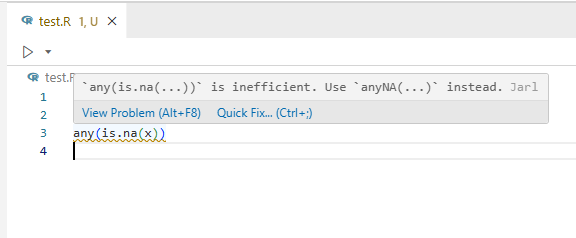
See Editor setup for installation instructions.
Integration with external tools
CI
Jarl can be used in continuous integration via GitHub Actions with setup-jarl.
See Continuous integration for more examples.
Pre-commit
Jarl has built-in support for pre-commit hooks, allowing you to lint staged files before each commit.
See Pre-commit tools for setup instructions.